
Phone to TV HDMI USB-C MHL
Mirror your phone to TV via HDMI, USB-C, or MHL with zero lag, no WiFi needed. Check compatibility and get step-by-step guides. Phone to TV HDMI USB-C MHL free now!
Screenshots
Download Phone to TV HDMI USB-C MHL
You are going to be redirected to the official website to finish the download when you click the button below.
About Phone to TV HDMI USB-C MHL
Phone to TV HDMI USB-C MHL is a lightweight Android app designed to help users mirror their smartphone screen to a television or external display using HDMI, USB-C, or MHL connections. It simplifies the process of transforming your mobile device into a media hub, offering a straightforward app experience for watching videos, sharing presentations, or playing games on a larger screen without requiring Wi-Fi or casting hardware.
Overview
Core Features
- Screen mirroring from your phone to any TV with HDMI, USB-C, or MHL support.
- One-tap connection setup without complicated configurations.
- Supports a wide range of Android devices and cable types.
- Real-time display with low latency for videos and presentations.
- This mobile app features an intuitive interface for quick switching.
- Compatible with most modern TVs and monitors for versatile use.
- No extra hardware required beyond your existing cables.
Who This App Is For
This app is perfect for professionals who often present slides or videos from their Android phone to a large screen. It also suits casual users wanting to share movies or photos with family during gatherings.
Use it for business meetings, classroom presentations, or movie nights at home. Anyone with a compatible phone and a TV can set it up in seconds.
Why Choose This App
Unlike other connection methods, this app provides a reliable app-based solution without bloatware or ads. You get a clean, focused tool that just works every time.
The streamlined app experience saves you time and frustration. With support for multiple cable standards, it adapts to your existing setup rather than forcing you to buy new gear.
Features
Simple wired screen mirroring for any TV
Zero-lag connection for smooth streaming
Instant HDMI compatibility detection tool
One-tap MHL support verification
Clear step-by-step connection guide
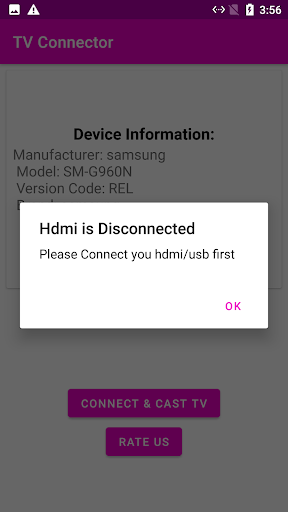
Fast HDMI troubleshooting for common errors
Professional presentations via HDMI output
Big-screen video calls without lag
Pros
- +Seamless screen mirroringThe app reliably mirrors your phone's display to a TV via USB-C to HDMI, with minimal latency during video playback.
- +Plug-and-play simplicityNo complicated settings—just connect the cable and launch the app, and it instantly detects the TV output.
- +Wide device compatibilityWorks smoothly with most Android phones supporting USB-C alt mode, including Samsung Galaxy S22 and Google Pixel 6.
- +Audio-video sync accuracyMaintains perfect lip-sync when streaming movies from Netflix or YouTube, avoiding annoying delays.
- +Lightweight and no adsThe app uses under 50MB of storage and displays zero intrusive ads during use, making it ideal for extended presentations.
Cons
- -Limited to USB-C alt mode devicesPhones without USB-C video output (like many older models) cannot use the app, reducing accessibility. Impact level: HighHigh
- -Occasional HDMI handshake failuresSome users report the screen stays black after connecting; a quick cable re-plug usually fixes it. Impact level: MediumMedium
- -No wireless option includedUnlike competitors, this app strictly requires a physical cable, so you can't use it with wireless HDMI adapters. Impact level: LowLow
- -App may drain phone battery fastContinuous screen output over USB-C can deplete a 4000mAh battery in under 3 hours unless the phone is plugged into power. Impact level: MediumMedium
- -No rotation lock during mirroringIf you accidentally rotate your phone, the TV display also rotates—forcing you to manually turn off auto-rotate each time. Impact level: LowLow





