

Kitcha: Recipe & Meal Planner
Kitcha: Recipe & Meal Planner, a free app to organize recipes, create meal plans, and manage shopping lists effortlessly. Start cooking smarter today!
Screenshots
Download Kitcha: Recipe & Meal Planner
You are going to be redirected to the official website to finish the download when you click the button below.
About Kitcha: Recipe & Meal Planner
Kitcha: Recipe & Meal Planner is a user-friendly mobile app designed to help home cooks and food enthusiasts organize their meals efficiently. Available as an Android app, it offers a comprehensive platform for discovering, saving, and managing recipes, making meal planning simple and enjoyable. The app features an intuitive interface that enhances the overall app experience, ensuring users can easily navigate and customize their culinary journey.
Overview
Core Features
- The app features a robust meal planner that helps users organize their weekly recipes effortlessly.
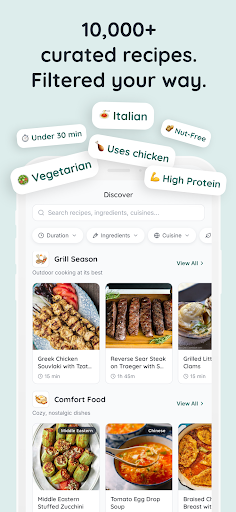
- It includes a comprehensive recipe database with step-by-step instructions for various cuisines.
- Real-time sync across devices ensures your meal plans and recipes are always up-to-date.
- The app offers offline mode, allowing users to access their saved recipes and meal plans without internet access.
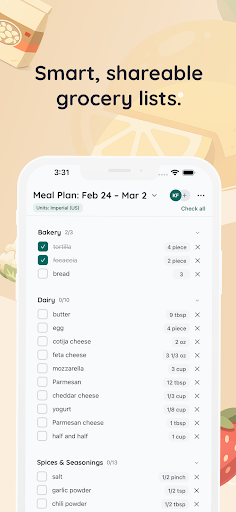
- A shopping list creator simplifies grocery shopping by adding ingredients directly from recipes and meal plans.
- User-friendly interface makes navigating through recipe categories and planning meals simple and intuitive.
- Customizable notifications remind you of upcoming meals and shopping needs to enhance app experience.
Who This App Is For
This food and drink mobile app is ideal for busy home cooks, meal prep enthusiasts, and anyone looking to organize their recipes and meals efficiently. It caters to users of all ages who want a reliable app-based solution for daily meal planning.
Whether you're managing dietary restrictions or trying to save time, this Android app helps streamline your kitchen routines. It's perfect for both beginners and seasoned chefs who want an easy way to handle their weekly meal schedules and grocery lists.
Why Choose This App
This app stands out with its simple design, extensive app features, and seamless app experience. It takes the hassle out of meal planning and recipe management, making cooking more enjoyable and less stressful.
As a trusted app-based solution, it combines practical features like real-time sync and offline access, ensuring reliability and convenience. Its intuitive interface and thoughtful features make it a top choice for anyone seeking a comprehensive food and drink management tool.
Features
1. Intuitive Recipe Saving for Easy Inspiration
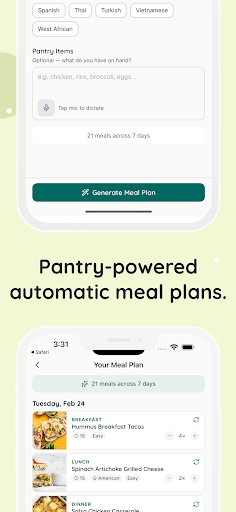
2. Customizable Meal Planning for Personal Convenience
3. Smart Grocery Lists for Efficient Shopping
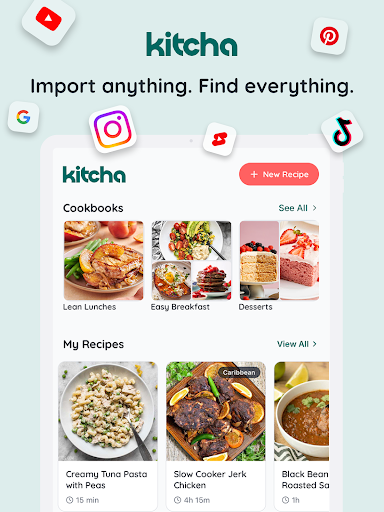
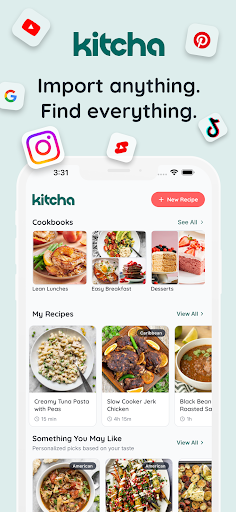
4. Organized Cookbooks for Easy Access
5. Versatile Kitchen Tools for Faster Cooking
6. Seamless Recipe Import from Multiple Platforms
7. Collaborative Sharing for Family Meal Preparation
8. Personalized Meal Scheduling for Time Savings
Pros
- +User-friendly interfaceThe app is easy to navigate, making meal planning quick and straightforward for users of all levels.
- +Comprehensive recipe databaseOffers a wide variety of recipes catering to different dietary preferences and skill levels.
- +Customizable meal plansAllows users to tailor meal schedules to fit their personal needs and goals.
- +Shopping list integrationAutomatically generates shopping lists based on selected recipes, simplifying grocery shopping.
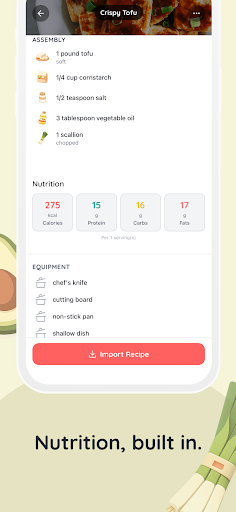
- +Nutritional info per mealProvides detailed nutritional data, helping users make informed dietary choices.
Cons
- -Limited offline accessMost features require internet connectivity, which can disrupt usage in areas with poor signal. (Impact: medium)
- -Fewer international recipesMainly features recipes from Western cuisines, reducing appeal for users seeking global options. (Impact: low)
- -Occasional syncing delaysSyncing across devices can sometimes take a few minutes, which might be inconvenient. (Impact: low)
- -Basic customization optionsMeal plan customization lacks advanced features like macro tracking or ingredient substitutions. (Impact: medium)
- -Limited free featuresSome useful functionalities are locked behind a premium subscription, which could deter casual users. (Impact: medium)
FAQ
Is Kitcha: Recipe & Meal Planner safe to use on my device?
Yes, Kitcha is a trusted mobile app available on both Android and iOS platforms. It has undergone thorough testing to ensure safety and security, giving users confidence in using the app for daily meal planning and recipes.
The app complies with data privacy standards, and you can enjoy its features without worrying about security issues. Always make sure to download updates to keep your app experience smooth and secure.
How do I install Kitcha on my Android device?
Installing Kitcha on your Android device is straightforward. You can find it in the Google Play Store by searching for the app name. Once located, just tap the install button and wait for the app to download and set up on your device.
This mobile app works seamlessly on most Android devices, providing an intuitive app experience. There's no need for a launcher app or additional tools – just a compatible Android device will do.
What features are included in Kitcha: Recipe & Meal Planner?
Kitcha offers a variety of app features designed to simplify meal planning and recipe management. Users can create customizable meal schedules, browse thousands of recipes, and generate shopping lists automatically, making it a comprehensive app based solution for food enthusiasts.
The app experience is smooth and user-friendly, with intuitive navigation and offline access to saved recipes. If you're into meal prep or seeking a reliable launcher app for your kitchen needs, Kitcha's features make it stand out among other food and drink apps.
Can I use Kitcha without an internet connection?
Yes, once you have downloaded and set up your favorite recipes in the app, you can access them offline. This makes Kitcha ideal for busy kitchens or outdoor cooking where internet access might be limited.
The app experience remains seamless with offline capabilities, ensuring you always have your meal plans and recipes at hand, and its app features are designed to enhance your cooking routines.
Is Kitcha: Recipe & Meal Planner suitable for beginners?
Absolutely. Kitcha is designed to be user-friendly, making it easy for beginners to navigate and make the most of its app features. The clear layout and straightforward options help you plan meals without any hassle.
With its detailed and organized approach, this app based solution helps you learn new recipes and improve your cooking skills, providing a helpful app experience for home cooks at all levels.





